1. What is Bhoomi RTC (Pahani) in Karnataka?
If you own, inherit, or plan to buy agricultural land in Karnataka, every transaction begins with a single document: the Bhoomi RTC. Launched in 2000 by the Revenue Department of Karnataka, the Bhoomi portal digitized over 20 million physical paper ledgers across the state to eliminate manual corruption, delay, and unauthorized alterations.
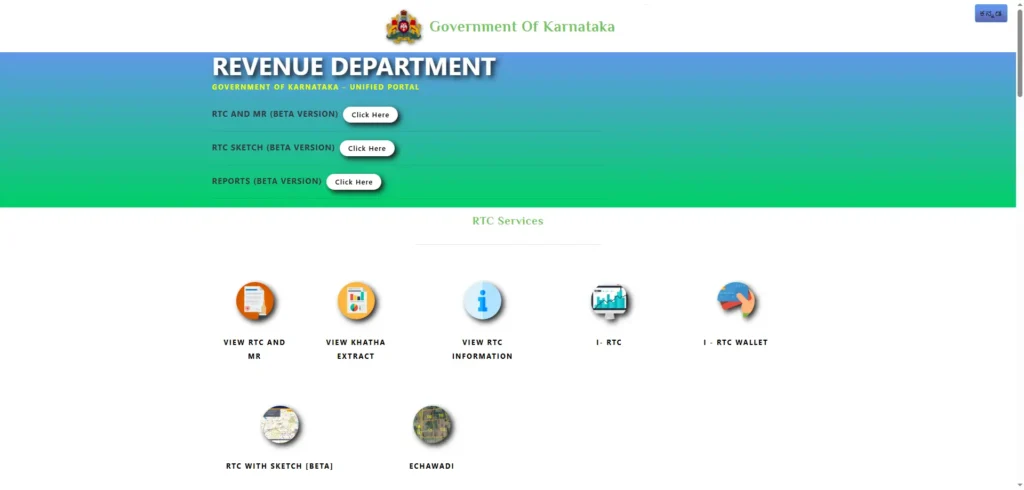
The Legal Role of Record of Rights, Tenancy, and Crops (RTC)
RTC stands for Record of Rights, Tenancy and Crops. In local Kannada parlance, it is commonly called the Pahani (ಪಹಾಣಿ).
It is crucial to understand that while an RTC is the primary working document maintained by the Revenue Department to track possession, cultivation, and land revenue, it is not a title deed in itself. Title is established through registered conveyance deeds (such as a Sale Deed or Gift Deed), whereas the RTC serves as the official state ledger recording who currently holds, cultivates, and owes tax on the land.
Key Information Recorded in a Pahani
A standard Bhoomi RTC is structured into 13 distinct columns that capture the entire physical and legal identity of a land plot:
Landowner & Khatedar Share Details
Column 9 records the owner’s name (Khatedar), father’s or husband’s name, unique revenue account number (Khata number), and exact extent of ownership shares. In cases of joint family ownership, each co-owner’s specific share is listed directly in acres and guntas.
Land Extent Format (Acres.Guntas.Fractional-Guntas / A.GG.FF)
Land measurements on an RTC are written in the standardized A.GG.FF format:
- A: Acres
- GG: Guntas (where 1 Acre = 40 Guntas)
- FF: Fractional Guntas (Phut Guntas)
Example: An extent listed as 1.21.00 does not mean 1.21 decimal acres; it represents 1 Acre and 21 Guntas (which equals 1.525 acres).
Column 11 Bank Liabilities, Crop Logs, and Mortgages
- Column 11 (Liabilities & Remarks): Tracks active mortgages, bank crop loans, encumbrances, court stay orders, or statutory restrictions under land ceiling laws.
- Column 12 & 13 (Crop Details & Cultivation): Logs seasonal crop cultivation (Kharif, Rabi, Summer), water sources, and cultivator details, which are vital for crop insurance claims and disaster relief (Parihara).
2. How to Check and View Bhoomi RTC Online (Free Method)
Checking land records in Karnataka no longer requires visiting a Taluk office or waiting in queues at the Village Accountant’s desk. Anyone can view live land records free of charge directly on the official portal.
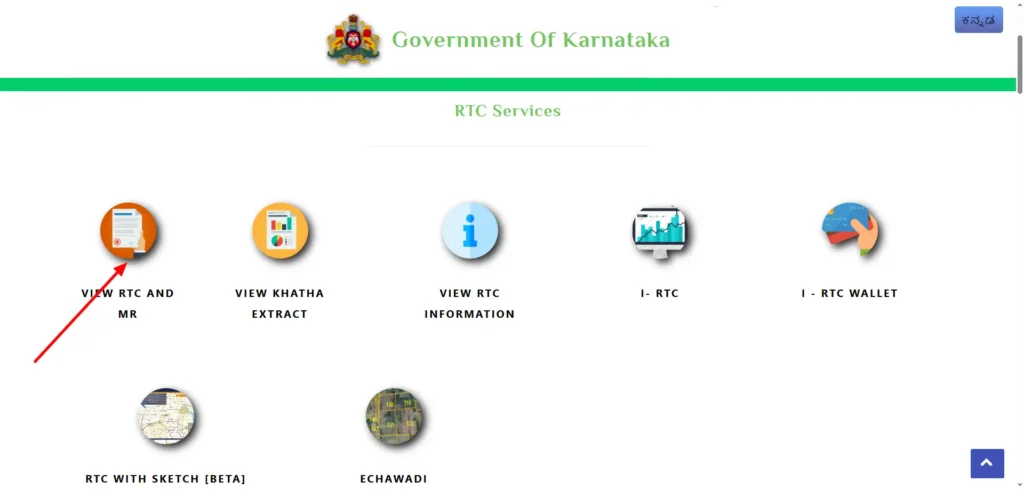
Step-by-Step Process to Search Land Records on landrecords.karnataka.gov.in
- Visit the official government website at landrecords.karnataka.gov.in.
- Click on the “View RTC and MR” link under the RTC Services section.
- Select your property’s geographic hierarchy from the drop-down menus: District → Taluk → Hobli → Village.
- Enter the primary Survey Number and click “Go”.
- Select the appropriate Surnoc (Survey Number Character) and Hissa Number (sub-division).
- Select the target Period (Current Year or Old Year) and click “Fetch Details”.
- The complete digitized Pahani will load on your screen for immediate verification.
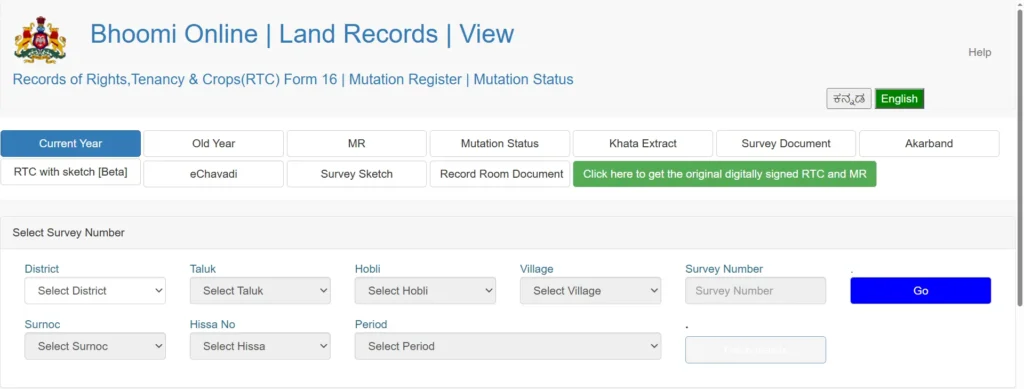
Decoding Land Identifiers on Bhoomi
What is a Survey Number, Surnoc, and Hissa Number?
- Survey Number: The primary numerical identifier assigned to a large block of land during revenue surveys.
- Surnoc (Survey Number Character): An alphabetical sub-code used when a main survey block undergoes initial administrative division.
- Hissa Number: The specific sub-division number assigned to an individual owner’s plot within that survey block.
What Does Surnoc Asterisk (*) and Paiki Numbers Mean?
- Surnoc Asterisk (*): When an asterisk
*appears in the Surnoc field, it indicates that no separate Surnoc letter was assigned, and the original survey boundary remains intact despite potential shared ownership. - Paiki / Pyki Numbers: These represent historical sub-divisions that were noted in revenue textual logs but never surveyed or mapped spatially on cadastral maps. Over 7 to 9 lakh Paiki numbers exist across Karnataka, which the Survey wing is actively resolving through pre-mutation sketches.
How to Search Old / Historical RTC Records
To trace ancestral ownership or verify historical title flow, select the “Old Year” tab on the RTC search screen. Select the specific range of years from the drop-down menu to view historical Khatedar names, past crop patterns, and older land extents.
3. Free RTC View vs. Digitally Signed i-RTC
While viewing an RTC online is completely free, property owners and buyers must distinguish between an informational view and an official document.
Critical Differences Between Free View and i-RTC
| Feature / Metric | Free RTC View | Digitally Signed i-RTC (Instant RTC) |
|---|---|---|
| Official Portal | landrecords.karnataka.gov.in | rtc.karnataka.gov.in |
| Cost | Free (₹0) | Statutory fee of ₹10 to ₹25 |
| Digital Signature | None | PKI-enabled Public Key Digital Signature & QR Code |
| Legal Validity | Informational / Verification only | Legally binding under Section 5 of Karnataka Land Revenue Act |
| Accepted By | Personal reference, initial due diligence | Commercial banks, home loan processing, civil courts, SRO sale registrations |
How to Download Official Digitally Signed i-RTC PDF
- Navigate to the official i-RTC portal at rtc.karnataka.gov.in.
- Choose “i-Wallet Services” and log in using your mobile number and an OTP.
- Select your property details (District, Taluk, Hobli, Village, Survey, and Hissa Number).
- Click “Fetch RTC” to review the details on screen.
- Pay the statutory fee (₹10–₹25) via UPI, net banking, or debit card.
- Download the certified PDF document, which includes a unique document ID and a verifiable QR code.
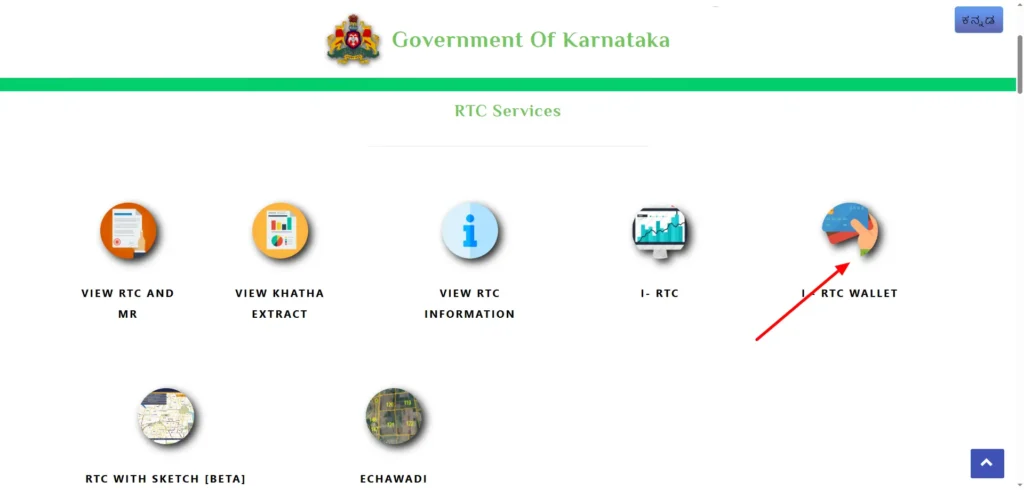
4. How to Check Bhoomi Mutation (MR) Status Online
When agricultural land is sold, inherited, gifted, or partitioned, registering the deed at the Sub-Registrar Office (SRO) is only the first step. The ownership change must be updated in the revenue record through a process called Mutation.
Understanding Land Mutation in Karnataka
In Karnataka, ownership changes generate a Mutation Register (MR) entry.
Since the rollout of auto-mutation, the Sub-Registrar’s software (Kaveri 2.0) automatically transmits an electronic transaction file called a J-Slip (XML data) directly to the Bhoomi portal upon sale registration. This auto-triggers a mutation case in Bhoomi without requiring the buyer to file a separate physical application at the Taluk office.
Steps to Track Mutation Application Progress
- Visit
landrecords.karnataka.gov.inand select “Mutation Status”. - Choose your District, Taluk, Hobli, and Village.
- Enter your Survey Number, Surnoc, and Hissa Number (or enter the specific Mutation Application Number).
- Click “Fetch Details” to view the workflow stage.
- Interpreting Status Messages:
- “Status: No mutation pending” (ಸ್ಥಿತಿ: ಯಾವುದೇ ಮ್ಯುಟೇಶನ್ ಬಾಕಿ ಇರುವುದಿಲ್ಲ): Indicates all previous transfers are complete and no new mutation is queued.
- “Under 15-day Public Notice Period”: The mandatory public objection window required under Sakala Act rules before final approval.
- “Approved & Updated in RTC”: The revenue inspector has approved the MR entry and the buyer’s name is live on Column 9.
5. Troubleshooting Common Bhoomi RTC Issues & Filing RTIs
Despite full digitization, database discrepancies and administrative stalls can occur.
Common Errors and Their Causes
“Data Not Found” Error
- Cause 1: Incorrect Hissa or Surnoc selection.
- Cause 2: The plot was converted from agricultural to non-agricultural use (DC Conversion) and shifted to an urban database.
- Cause 3: Older manual records have not yet been migrated to the digital server.
“Y” Restriction Flag
A red “Y” flag on an RTC indicates an active restriction. This signifies that the parcel has an active court stay order, an unpaid bank mortgage, a government land-acquisition notification, or a transaction ban under SC/ST (PTCL) grant protection laws.
Name Mismatches & Legacy Errors
Transliteration mistakes made during initial data entry in 2000–2002 can lead to spelling mismatches between Aadhaar cards and Column 9 Khatedar records.
Using the Right to Information (RTI) Act for Stuck Files
When a mutation stays pending for months or an incorrect entry is not rectified, visiting counter desks often yields no results. Filing a statutory application under the Right to Information (RTI) Act, 2005 obligates officials to provide written responses under threat of statutory penalties.
- Target Public Information Officer (PIO):
- Tahsildar’s Office: For stuck mutations, missing RTC records, and Column 9 name errors.
- Assistant Director of Land Records (ADLR): For pending 11E survey sketches, Tatkal Podi, and boundary demarcation delays.
- Statutory Limit: Under Section 7(1) of the RTI Act, the PIO must deliver an official written response within 30 days.
6. RTC (Rural) vs. Khata (Urban): Why Your City Property Isn’t on Bhoomi
One of the most common points of confusion for urban home buyers is attempting to search for a city apartment or residential layout on the Bhoomi portal.
Jurisdictional Boundary: Agricultural vs. Converted / Urban Land
- Bhoomi RTC (Rural Ledger): Exclusively tracks agricultural, rural, and unconverted revenue land.
- DC Conversion: When agricultural land receives a Deputy Commissioner (DC) Conversion order for residential or commercial use, the Bhoomi RTC ledger is closed (marked as Bu.Pa / Bhu-Parivartan).
- Urban Khata Systems:
- e-Aasthi: Manages urban properties, apartments, and commercial sites within municipal corporation limits (such as BBMP in Bengaluru).
- e-Swathu: Tracks non-agricultural properties located within Gram Panchayat jurisdictions (Form 9 and Form 11B).
7. Competitor Analysis & Correlative Portals
Essential Land Verification Tools Integrated with Bhoomi
To conduct complete due diligence, buyers should use Karnataka’s full suite of integrated land portals:
- Kaveri 2.0 (kaveri.karnataka.gov.in): Used to view Encumbrance Certificates (EC), check market guidance values, and register sale deeds.
- Mojini & Svavalambi (
bhoomojini.karnataka.gov.in): Handles 11E pre-mutation survey sketches, Tatkal Podi sub-divisions, and field measurement maps (Tippan). - Dishaank App (apps.karnataka.gov.in): A mobile GIS application developed by KSRSAC that uses smartphone GPS to overlay survey boundaries and Hissa polygons directly on satellite imagery.
Frequently Asked Questions (FAQs)
Is a free RTC printout legally valid for a bank loan?
No. Free RTC printouts obtained from landrecords.karnataka.gov.in are for informational purposes only. Banks, financial institutions, and civil courts require a digitally signed i-RTC (costing ₹10 to ₹25) obtained from rtc.karnataka.gov.in.
How long does the land mutation process take in Karnataka?
Under Sakala Act guidelines, automatic mutations without notice periods (such as mortgage releases) take 1 to 5 days. Mutations requiring a mandatory public notice period (such as sale deeds or inheritance transfers) take between 10 and 32 days.
What should I check in an RTC before buying land?
- Column 9: Ensure the seller’s name matches their Aadhaar card exactly.
- Acreage: Verify that the extent listed in Column 3 matches the sale agreement.
- Column 11: Confirm there are no uncleared bank loans, court stay orders, or government restrictions.
- Mutation Reference: Verify the MR number next to the owner’s name to confirm how they legally acquired the plot.